A used smartphone can save you hundreds of euros — or cost you double if you're not careful. Whether you're replacing a broken device, helping a student stay connected, or just hunting for a better deal, buying used smartphones in Belgium is smarter than ever. But knowing what to check is the difference between a great buy and an expensive regret.
This guide gives you a practical, no-nonsense checklist so you walk away confident, not cheated.
Why Belgians Are Buying More Used Phones
Second-hand electronics have become a genuine first choice — not just a fallback. With flagship smartphones regularly priced above €1,000 new, the used market offers real value for budget-conscious families, students, and anyone who simply doesn't need the latest model.
Local marketplaces have made it easier than ever to find devices nearby, meet in person, and skip the uncertainty of long-distance shipping. That convenience matters. So does knowing exactly what to look for before you hand over your cash.
The Essential Phone Checklist Before You Buy
Take this checklist to every meetup. No exceptions.
1. Check the IMEI Number
The IMEI is your phone's fingerprint. Before anything else, ask the seller for it.
- Dial
*#06#on the device to display the IMEI - Check it against the box if available — they must match
- Use a free IMEI checker to confirm the phone isn't reported stolen or blacklisted
A mismatched or blocked IMEI is a hard stop. Walk away.
2. Test Battery Health
Battery health is one of the most overlooked parts of a used phone purchase — and one of the most important.
- On iPhone: go to Settings → Battery → Battery Health & Charging. Anything below 80% indicates the battery is degraded and may need to be replaced soon.
- On Android, many manufacturers include battery diagnostics in settings, or you can use a trusted third-party app during the meeting.
A phone with 70% battery health at a "great price" might not be such a great deal once you factor in replacement costs.
3. Inspect the Screen and Body
In person, take your time.
- Check the screen in bright light for cracks, dead pixels, or discoloration
- Run a white image on the screen to spot burn-in (especially common on OLED panels)
- Look at the frame and back for deep scratches, dents, or signs of water damage
- Check that the camera lenses are scratch-free and unfogged
A few small scratches are normal. Anything structural is a negotiation point — or a reason to pass.
4. Test All Functions
Don't just power the phone on. Put it through its paces.
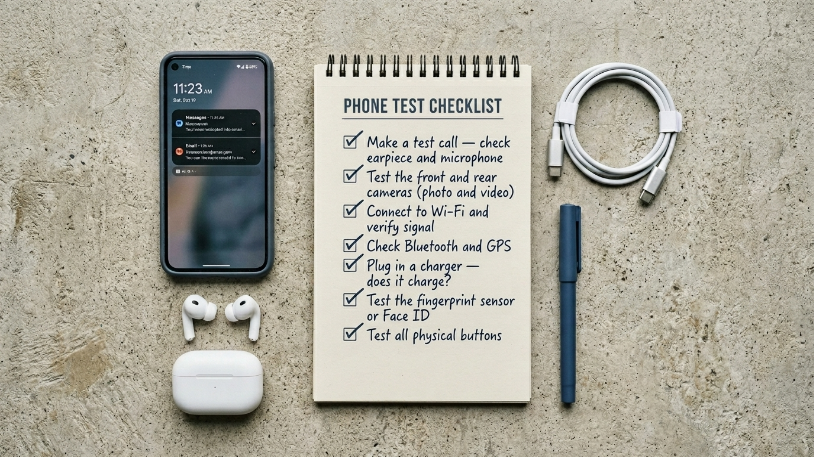
Run through this list:
- Make a test call — check the earpiece and the microphone
- Test the front and rear cameras (photo and video)
- Connect to Wi-Fi and verify the signal
- Check Bluetooth and GPS
- Plug in a charger — does it charge?
- Test the fingerprint sensor or Face ID
- Test all physical buttons: volume, power, and the silent switch
- Check both speakers
Any function that doesn't work is a bargaining chip — or a dealbreaker, depending on your needs.
5. Verify the Software and Locks
- Confirm the phone is running official, up-to-date software (not a modified or rooted version)
- On iPhone: check that iCloud Activation Lock is disabled — go to Settings → [Apple ID] and confirm no account is linked
- On Android: ensure Google account locks are removed before you pay
- Ask for a factory reset before completing the purchase
A phone that's still linked to a previous owner's account is essentially unusable. Never pay before these locks are cleared.
Used iPhone in Belgium — Extra Steps to Take
Used iPhones in Belgium are among the most searched second-hand devices — and for good reason. They hold value, receive long software support, and are widely available. But they also come with specific risks.
Beyond the standard checklist:
- Verify the Apple warranty status at checkcoverage.apple.com (ask the seller to do this together)
- Check if the device was repaired with non-genuine parts — this affects battery health readings and Face ID
- Confirm the model is EU-compatible (important if it was imported from outside Europe)
A genuine, fully unlocked iPhone with solid battery health is worth paying a fair price for. Just make sure you verify before you commit.
How to Meet Safely and Pay Smartly
Meeting a stranger to hand over money for electronics is not something to rush. A few simple habits make the whole experience safer.
- Meet in a public place — a café, a shopping center car park, or even outside a police station
- Bring a friend if you're carrying significant cash
- Don't pay until you've completed every check on this list
- Prefer cash for simplicity, but if you use a transfer, make sure the device is fully reset and in your hands first
- Never pay in advance without meeting in person
For more details, our guide on safe payment tips for Belgian buyers and sellers covers the full picture.
Where to Find Reliable Used Smartphones in Belgium
Once you know what to check, the next step is knowing where to look. Browse used mobile phones on DealDone to find listings from local sellers across Belgium — with contact options, photos, and prices clearly listed.
Whether you're after a budget Android phone, a used iPhone in Belgium, or something in between, local listings let you meet, test, and buy with confidence. While you're at it, don't overlook phone accessories — cases, chargers, and screen protectors are often listed separately at excellent prices.
And if you have a device to sell, check our tips on how to write listings that actually attract buyers and how to sell faster on marketplace platforms.
FAQ
Q1: How do I check if a used smartphone is stolen in Belgium? Ask for the IMEI number (dial *#06#) and verify it using a free IMEI checker online. A phone that comes back as blacklisted or reported stolen cannot be used on Belgian networks and should never be purchased.
Q2: What battery health percentage is acceptable for a used iPhone in Belgium? Aim for 85% or above for comfortable everyday use. A reading below 80% indicates the battery is officially degraded according to Apple, and a replacement will likely be needed within months.
Q3: Is buying a used smartphone in Belgium safe? Yes — if you take the right precautions. Meet in person, test the device thoroughly, clear all account locks before paying, and use a public location for the exchange. Never pay up front without seeing the phone.
Q4: What should I check on a used Android phone before buying? Check the IMEI, run through all hardware functions, verify Google account locks are removed, check battery health with a diagnostic app, and inspect the screen and body carefully. Request a factory reset before completing the purchase.
Q5: Can I negotiate the price of a used phone at a Belgian marketplace? Absolutely. Any defects you find during inspection — scratched screen, degraded battery, missing accessories — are fair grounds for negotiation. Come prepared with your checklist and use your findings constructively.
Q6: What's the difference between an unlocked and a locked used smartphone? An unlocked phone works with any SIM card and any Belgian network (Proximus, Base, Orange). A locked phone is tied to a specific operator. Always confirm the unlock status before buying, especially for imported devices.
Conclusion
Buying used smartphones in Belgium is one of the best ways to get serious value — as long as you know what to look for. Run the IMEI check, test battery health, verify every function, and clear all account locks before you pay. Do it right, and you'll walk away with a great phone at a fraction of the retail price.
Ready to find your next device? Explore mobile phone listings on DealDone and discover local deals near you today.
Stay connected with DealDone on Facebook, Instagram, and LinkedIn. Questions? Contact us — we're happy to help.